Unix and Linux history
This subchapter looks at cool shell tricks for Unix, Linux, and Mac OS X to give you an idea of the power of the shell.
A quick summary of how to get to the shell is included in this subchapter (more detailed explanations, including what to do when things go wrong, are in following subchapters.
WARNING: Never trust any Terminal/Shell commands you find on the internet. Only run shell commands you understand. In particular, never run anything that includes sudo anywhere in the command line unless you are absolutely certain what the command does. When you run a command line with sudo you are giving permission to have complete (possibly destructive) control of your computer at the root level. And, yes, this advice appies even to this website. Don’t run any commands with sudo unless you know for sure what you are doing.
cool shell tricks
This chapter has a handful of cool shell tricks. These are intended to show a beginner that a command line shell can be as fun as any graphic user interface and get across the idea that there is a lot of power in the shell that simply doesn’t exist in a standard graphic user interface.
definitions
Unix is one of the ground-breaking operating systems from the early days of computing. Mac OS X is built on top of Unix. Linux is a variation of Unix.
The shell is the command line interface for running Unix (and Mac OS X and Linux) with just typing (no mouse).
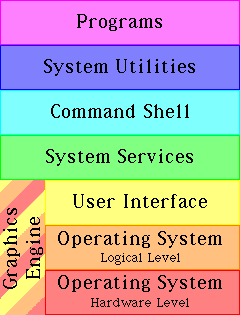
operating system The software that provides a computer’s basic tasks, such as scheduling tasks, recognizing input from a keyboard, sending output to a display screen or printer, keeping track of files and folders (directories), running applications (programs), and controlling peripherals.
Unix Unix (or UNIX) is an interactive multi-user multitasking timesharing operating system found on many types of computers. It was invented in 1969 at AT&T’s Bell Labs by a team led by Ken Thompson and Dennis Ritchie. Some versions of Unix include: AIX, A/UX, BSD, Debian, FreeBSD, GNU, HP-UX, IRIX, Linux, Mac OS X, MINIX, Mint, NetBSD, NEXTSTEP, OpenBSD, OPENSTEP, OSF, POSIX, Red Hat Enterprise, SCO, Solaris, SunOS, System V, Ubuntu, Ultrix, Version 7, and Xenix.
Linux An open-source version of the Unix operating system.
graphical user interface A graphical user interface (GUI) is a windowing system, with windws, icons, and menus, operated by a mouse, trackball, touch screen, or other pointing device, used for controlling an operating system and application programs (apps). The Macintosh, Windows, Gnome, and KDE are famous examples of graphical user interfaces.
command line interface A command line interface (CLI orcommand line user interface CLUI) is a text only interface, operated by a keyboard, used for controlling an operating system and programs.
shell The shell is the command line interface for Unix, Linux, and Mac OS X. In addition to intrepetting commands, it is also a programming language.
shell uses
The Unix shell is a very powerful programming language, with access to hundreds of useful tools that are designed to work with each other, and access to the very heart of the operating system (although this is only available to the root or superuser account for security reasons).
Unix (and therefore also Mac OS X and Linux) has more than 200 basic commands (also called tools or utilities) that are distributed with the standard operating system. This collection and the ease with which they work together is the major source of the power of Unix. The vast majority of these standard tools are designed to be used from a command line (the shell).
The shell is most commonly used to control servers. Servers are the computers used to host websites. The most common operating system for the world’s web servers is Linux. If you learn shell scripting and system administration, you can run your own server and possibly get a job.
The shell can be used to control a desktop or portable computer. Some tablets and smart phones have a shell. The iPhone actually has a shell, but it can’t be accessed witout jailbreaking the iPhone.
The shell will often run even when a computer is partly broken. Both Mac OS X and Linux (as well as almost all versions of Unix) can be run in a special single user mode. This starts up the computer or server with just the command line shell running. This can be used to service a computer or server, including both diagnosis and repair.
The shell is extremely useful for programming. Even when a programmer uses a graphical integrated development environment (IDE), the programmer is likely to still heavily use the shell for programming support. Some IDEs even have shell access built-in.
Shell scripts are widely used by system administrators for performing common tasks.
command line interface
Before the widespread introduction of graphic user interfaces (GUI), computers were controlled either by punched cards, paper tape, or magnetic tape (a batch system) or a command line interface (CLI) using an interactive terminal (originally, some variation of a teletype machine from the telegraph technology). The earliest computers were controlled by front panel lights and switches or even by directly changing the wiring.
The command line interface on interactive terminals was a major advance. Because of limitations of the early hardware (at a time when a computer’s entire memory might be measured in hundreds of bytes), the first CLIs compressed the number of characters, using two or three letter abbreviations for commands and single character switches for options to commands.
The modern Unix/Linux shells carry over this early limitation because there is the need to remain backward compatible and still run shell scripts that are decades old, but essential to continued operation of legacy systems.
This historical limitation makes it difficult for newcomers to figure out how to use a Unix/Linux shell.
how to find Terminal
You can run these commands by copying and pasting into Terminal, a program that is available for free and preinstalled on Mac OS X and most versions of Linux. Some of these commands will only work on a particular operating system (this will be indicated), but most can be run from Mac OS X, any distribution Linux, and any kind of Unix.
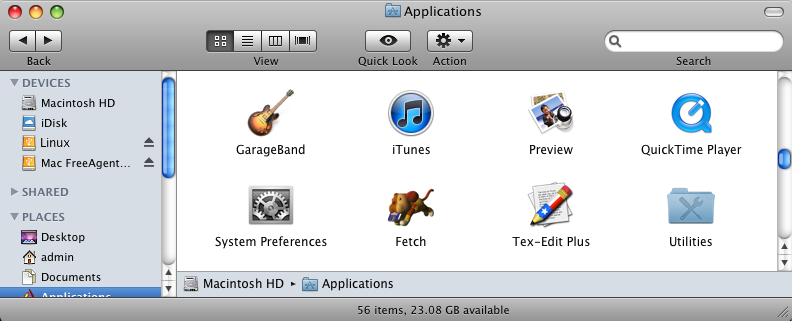
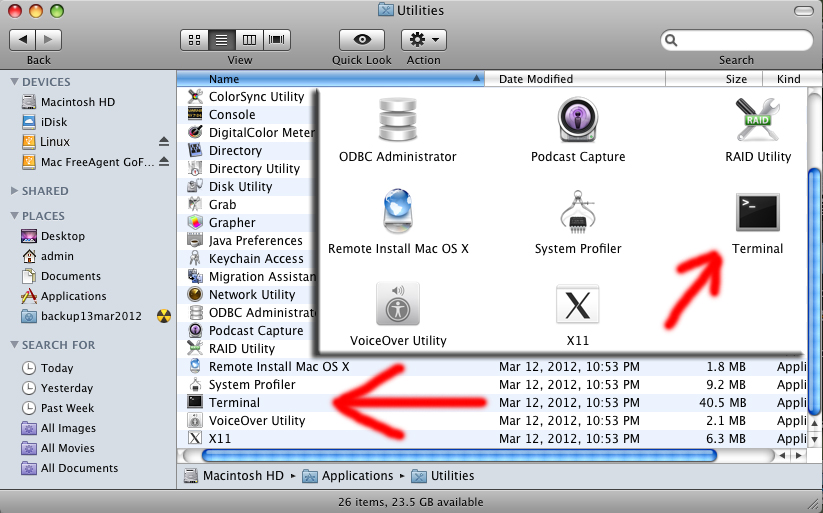
On Mac OS X, you will find Terminal by opening the Applications folder (on your main hard drive), then opening the Utilities folder, then scrolling down the list until you find Terminal or Terminal.app. Drag it to your Dock, because you will be using it a lot.
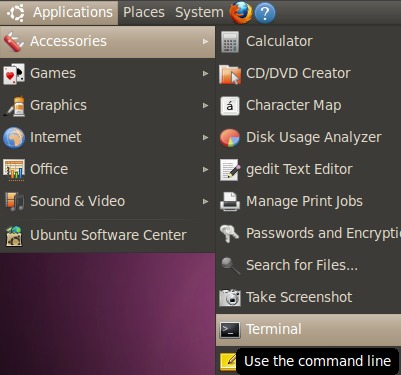
On Ubuntu Linux, look in Applications menu > Accessories > Terminal. Single click and hold, then drag to your panel, because you will be using it a lot.
On some versions of Linux, you can press the CONTROL and the ALT and the F1 keys all at once to bring up Terminal.
In Gnome, use the Applications menu > Accessories > Terminal or the keyboard shortcut of CONTROL and ALT and T (all at the same time).
In KDE, use the KMenu > System > Terminal Program (Konsole).
In Linux Mint you can use the keyboard shortcut of holding down the CONTROL and ALT and T keys all at once.
As a last resort, you can use the file search feature in Linux or Mac OS X and search for “Terminal”.
warnings
Be careful about any hints you find on the internet. There are people who suggest very destructive commands in the guise of a useful or fun hint just to trick beginners into destroying their computers.
Be very careful if you use any command that includes sudo, because it runs at the root level, allowing complete access to the entire computer with all safeguards turned off. Very powerful. Potentially very distructive in a hurry. There are legitimate hints and cool tricks that use sudo, but be careful to type them exactly as you you see them in the hint (or copy and paste) and only use sudo hints from trusted soruces.
Watch out for anything that includes the command rm or rm *. That is the remove command versions of it can literally wipe out all of your hard drives in seconds in such a way that only a very expensive data recovery specialist (thousands of dollars) can get your data back.
Also watch out for anything that includes the command shred. That is the secure delete and even the most expensive data recovery specialist in the world can’t get your data back.
cool ASCII art
If your computer is connected to the internet, you can use the shell to watch the entire Star Wars Episode IV in old fashioned ASCII. Type telnet towel.blinkenlights.nl followed by ENTER or RETURN. If you have IPv6, you get extra scenes and color support.
$ telnet towel.blinkenlights.nl
play a CD
On Linux you can play a CD from the command line. The following example plays the first track of the CD. Change the number to play a different track.
$ cdplay play 1
On Linux you can get a free coffee cup holder (eject the CD-ROM tray).
$ eject
$ telnet towel.blinkenlights.nl
comments, suggestions, corrections, criticisms
free music player coding example
Coding example: I am making heavily documented and explained open source code for a method to play music for free — almost any song, no subscription fees, no download costs, no advertisements, all completely legal. This is done by building a front-end to YouTube (which checks the copyright permissions for you).
View music player in action: www.musicinpublic.com/.
Create your own copy from the original source code/ (presented for learning programming).
This section is under the category of owning cirticism.
In response to a posting about my article collecting social media, Moderator +Andrew Smith (Technology addict, Web Developer, API guru, futsal and football wannabe, and all round nice guy!, Swordfox Design, arrowtown, new zealand) of the Google+ community Web Developers, Web Designers, Web Coding claims “Quite frankly this is self promotion, and your site is not of great quality. I can see how +Joost SchuurÊ would think this of not high enough a standard.”
Because I no longer have the computer and software to make PDFs, the book is available as an HTML file, which you can convert into a PDF.
Names and logos of various OSs are trademarks of their respective owners.




 computers using
  and served using
  .
.
